


Lifting Column Sets
-
LG-14
LG-14 Electric Lifting Column - 67 lb, 4-Stage
Force (lbs) 67Column Stages 4Starting from i PricingThe final pricing depends on the product specifications and the quantity ordered. See details at the product page. $466.73 CAD -
LG-02
LG-02 3-Stage Electric Lifting Column - 180 lb Adjustable Height
Stroke (Inch) 25.5Force (lbs) 180Column Stages 3Starting from i PricingThe final pricing depends on the product specifications and the quantity ordered. See details at the product page. $418.73 CAD -
LG-13
LG-13 2-Stage Slim Electric Lifting Column - 230 lb
Stroke (Inch) 16Force (lbs) 230Column Stages 2Starting from i PricingThe final pricing depends on the product specifications and the quantity ordered. See details at the product page. $428.73 CAD -
LG-11
LG-11 3-Stage Compact Electric Lifting Column - 230 lb
Stroke (Inch) 16.5Force (lbs) 230Column Stages 3Starting from i PricingThe final pricing depends on the product specifications and the quantity ordered. See details at the product page. $469.73 CAD -
LG-03
LG-03 2-Stage Heavy Duty Electric Lifting Column - 440 lb
Stroke (Inch) 16Force (lbs) 440Column Stages 2Starting from i PricingThe final pricing depends on the product specifications and the quantity ordered. See details at the product page. $528.73 CAD -
LG-07
LG-07 3-Stage Heavy Duty Electric Lifting Column - 440 lb Extended Height
Stroke (Inch) 32Force (lbs) 440Column Stages 3Starting from i PricingThe final pricing depends on the product specifications and the quantity ordered. See details at the product page. $599.73 CAD -
LG-12
LG-12 2-Stage Ultra Heavy Duty Electric Lifting Column - 1300 lb
Stroke (Inch) 16Force (lbs) 1300Column Stages 2Starting from i PricingThe final pricing depends on the product specifications and the quantity ordered. See details at the product page. $559.73 CAD -
Last ChancePA-TS1
Telescopic Lifting Column Linear Actuator with Hall Feedback
Voltage 24 VDCStroke 12-24 inchForce 270 lbsStarting from i PricingThe final pricing depends on the product specifications and the quantity ordered. The more you buy, the cheaper it is. See details at the product page.$481.99 CAD$241.99 CAD -
FLT-11
Lifting Column Set - 225 lbs - Stroke Size 16.5"
Stroke (Inch) 16.5Force (lbs) 225Column Stages 3 -
FLT-03-2-1
Lifting Column Set - 440 lbs - Stroke Size 16"
Stroke (Inch) 16Force (lbs) 440Column Stages 2


Compare Telescopic Lifting Columns
Find the right lifting column for your installation. Compare each model’s lifting capacity, travel distance, height range, stages, and dimensions, then open the product page for complete specifications and configuration options.
Select a model to view its specification diagram.

Build your setup around the number of columns your project requires. Compatible LG modular lifting columns can be configured in systems with one to four legs using an appropriate FLTCON control box and compatible remote.
Select your column model, number of legs, control box, and remote together. Check compatibility and the components included in your configuration before ordering.
Add powered height adjustment to custom tables, concealed furniture, and workstations. Compare retracted height and mounting dimensions for installations with limited space, and check the extended height and travel distance against your project requirements.
Explore the LG-11 for a compact retracted height or the LG-13 for a slim column profile.
For heavier platforms and equipment, compare the LG-03 and LG-07, each rated for up to 440 lbs of lifting force per column, or the LG-12, rated for up to 1,300 lbs per column.
Select a system based on the complete moving load, load distribution, mounting arrangement, and control compatibility. Confirm the required capacity for your installation before ordering.
Choose a compatible configuration with one, two, three, or four columns. Match your FLTCON control box to the selected column model and number of legs.
Choose from compatible wired remotes and supported wireless options for your control system. Features such as memory presets and travel limits depend on the remote and control box selected.

Setup and Troubleshooting
NOTE: The steps below may vary depending on the remote model that you have. The following instructions were made for the popular RT-11 remote. To set the maximum height for your system, go to the desired height you would like to set and follow the steps below:
1. Press M and see [5 -] indicated on the display
2. Press the UP button and notice [5 -] blinks
3. Hold the M button until you see [999] on the display
4. The maximum height has now been set
To set the minimum height for your system, go to the desired height you would like to set and follow the steps below:
1. Press M and see [5 -] indicated on the display
2. Press the DOWN button and notice [5 -] blinks
3. Hold the M button until you see [000] on the display
4. The minimum height has now been set
To reset the limits, follow the steps below:
1. Press M and see [5 -] indicated on the display and release
2. Hold the M you see [555]
3. Limits have been reset
NOTE: The steps below may vary depending on the remote model you have. The following instructions were made for the standard RT-11 remote.
If you have to hold down the remote’s buttons to get to your pre-set height, this means that your control box is in momentary control. To set your remote to non-momentary mode, follow the steps below:
1. Make sure that there is nothing underneath your system, as we must enter the reset procedure
2. Press and hold the DOWN button until the display shows [ASr]
3. Once [ASr] is shown, press and hold down [1] and you may see two values:
a. 10.1 = Non-momentary Mode
b. 10.2 = Momentary Mode
4. Complete the reset procedure by holding the DOWN button until your system slightly lowers and rises.
We have some troubleshooting steps for you to take if you see any of the following error codes on the remotes that come with an LED display.
Сheck the error code here.
If the issue you are experiencing persists after following these steps, please feel free to contact our technical product engineers at 1-800-676-6123 or send us an email at sales@progressiveautomations.com
Need help comparing specifications? Read our lifting column selection guide.
Lifting column applications
Where Can You Use Electric Lifting Columns?
Raise and lower work surfaces, custom furniture, and equipment with electric lifting columns. Match the lifting force, travel, and installation dimensions to your project, then select compatible controls.
Industrial Workstations
Adjust an assembly table or equipment support to the required working height. Compare rated lifting force and duty cycle against the complete moving load and operating schedule.
Custom Desks
Add powered height adjustment to a custom desktop. Check the lowest and highest finished surface positions, including the base and tabletop, before choosing your columns.
Hidden Tables & Furniture
Raise a concealed table when needed and retract it after use. Compare the LG-11’s compact retracted height with the LG-13’s slim profile for installations with limited space.
Multi-Purpose Tables
Use height adjustment to transform a single table into a versatile, multi-functional surface. With the LG-11, a table can be adapted for different uses, such as a coffee table, breakfast table, or kitchen island extension, making it a practical solution for flexible living spaces.
Choose by the complete installation requirements. Our lifting column selection guide covers load, travel, operating environment, and controls.
System selection
How to Select and Install Your Lifting Columns
Check the required lifting force
Include the tabletop or platform, equipment, and working load. Compare the required lifting force with the selected model’s rating and account for uneven load distribution.
Check the installed height range
Confirm that the retracted and extended positions fit your installation. Allow for the base, mounting hardware, and surface thickness.
Confirm the mounting arrangement
Review the model’s drawings and mounting dimensions against your structure. Column placement and load distribution affect the requirements of a multi-column installation.
Connect and initialize the system
Follow the installation manual and wiring diagram for your selected columns, controller, and remote. Complete the specified reset procedure before operating the system.
FLTCON control systems
Choosing a FLTCON Control Box for Lifting Columns
Our FLTCON control boxes operate compatible 24 VDC lifting columns with Hall effect feedback. Multi-channel models use that feedback to synchronize matching columns. Select the controller for your column model, number of legs, and available input power.
FLTCON channel configurations
| Your configuration | Control box | Before ordering |
|---|---|---|
| One column | FLTCON-1 · Single channel | Confirm the supported 24 VDC Hall effect column model and required programming. |
| Two matching columns | FLTCON-2 · Two channels | Confirm column compatibility, input power, and programming for synchronized travel. |
| Three matching columns | FLTCON-3 · Three channels | Confirm the specific column model and programming for the three-column setup. |
| Four matching columns | FLTCON-4 · Four channels | Confirm the specific column model and programming for the four-column setup. |
FLTCON control boxes require programming for the connected product model before shipping. Confirm your column model, current requirements, connections, and input voltage through the programming form on the controller product page. For a two-column system powered by 24 VDC, review the FLTCON-2-24VDC.
Choose Your Remote
The RT-11 wired remote provides four memory positions with compatible FLTCON controls. Save frequently used working heights, then return to them from the handset. Other remote features depend on the model selected.
Check What Is Included
Standalone FLTCON control boxes do not include a wired remote. Check the components included in your lifting column configuration before adding controls, cables, or accessories. See our FLTCON-2 and FLTCON-4 guide for control system examples.
Explore the specifications and configuration options for each model.
-
View Details
 LG-02 Modular Lifting Columns
- Lifting capacity per column 180 lbs
- Stages 3
-
View Details
 LG-03 Modular Lifting Columns with Remote Control Selection
- Lifting capacity per column 440 lbs
- Stages 2
-
View Details
LG-07 Modular Lifting Columns with Remote Control Selection
- Lifting capacity per column 440 lbs
- Stages 3
-
View Details
LG-12 Modular Lifting Columns with Remote Control Selection
- Lifting capacity per column 1300 lbs
- Stages 2


Real Lifting Column Projects

Our customer stories
Hidden Japanese Low Dining Table Lift
A concealed dining table that rises when needed. Explore the customer’s project and the current LG-07 replacement configuration.

Our customer stories
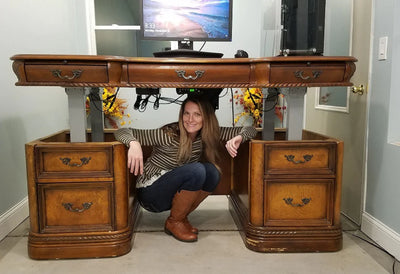
Executive Desk Into a Standing Desk
See how a customer added powered height adjustment to an executive desk. Explore the current LG-02 replacement configuration.

Our customer stories
Phantom Bench by Dr. Decks
Discover a hidden bench revealed by a powered lifting system. Explore the current LG-03 replacement configuration.